Intelligent Video Analytics: How It Works, Benefits, and Use Cases
On this page
- What Is Intelligent Video Analytics?
- Intelligent Video Analytics vs. Traditional Video Surveillance
- How Does Intelligent Video Analytics Work?
- Key Technologies Behind Intelligent Video Analytics
- Common Applications of Intelligent Video Analytics
- Benefits of Intelligent Video Analytics
- Where Intelligent Video Analytics Runs: Edge, On-Premises, and Cloud
- Challenges and Limitations of Intelligent Video Analytics
- What to Look for in Intelligent Video Analytics Software
- How to Implement Intelligent Video Analytics: A Practical Checklist
- How Prexable Supports Custom Video Analysis
- Frequently Asked Questions
- Conclusion
- References and Further Reading
Video cameras can capture hours of footage, but recorded video is only useful when people or systems can find and interpret the information that matters. Reviewing large amounts of footage manually can take time, especially when teams need to identify specific objects, follow movement, or understand what happened during an event.
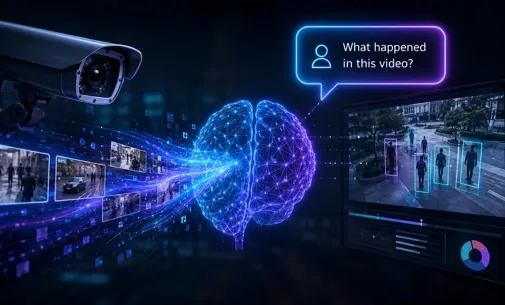
Intelligent video analytics uses artificial intelligence (AI) and computer vision to analyze video and extract meaningful information from it. Depending on the system and its intended use, this can include detecting objects, tracking movement, recognizing selected categories, and identifying events or activities.
For businesses, the value is not simply collecting more video. It is making video information easier to analyze and use for a specific operational need. This guide explains what intelligent video analytics is, how it works, where it can be applied, and what to consider when evaluating an intelligent video analytics platform.
What Is Intelligent Video Analytics?
Intelligent video analytics is the automated analysis of video footage using technologies such as computer vision and machine learning. These technologies help software identify objects and patterns in video, follow movement across frames, and interpret visual information according to a defined task.
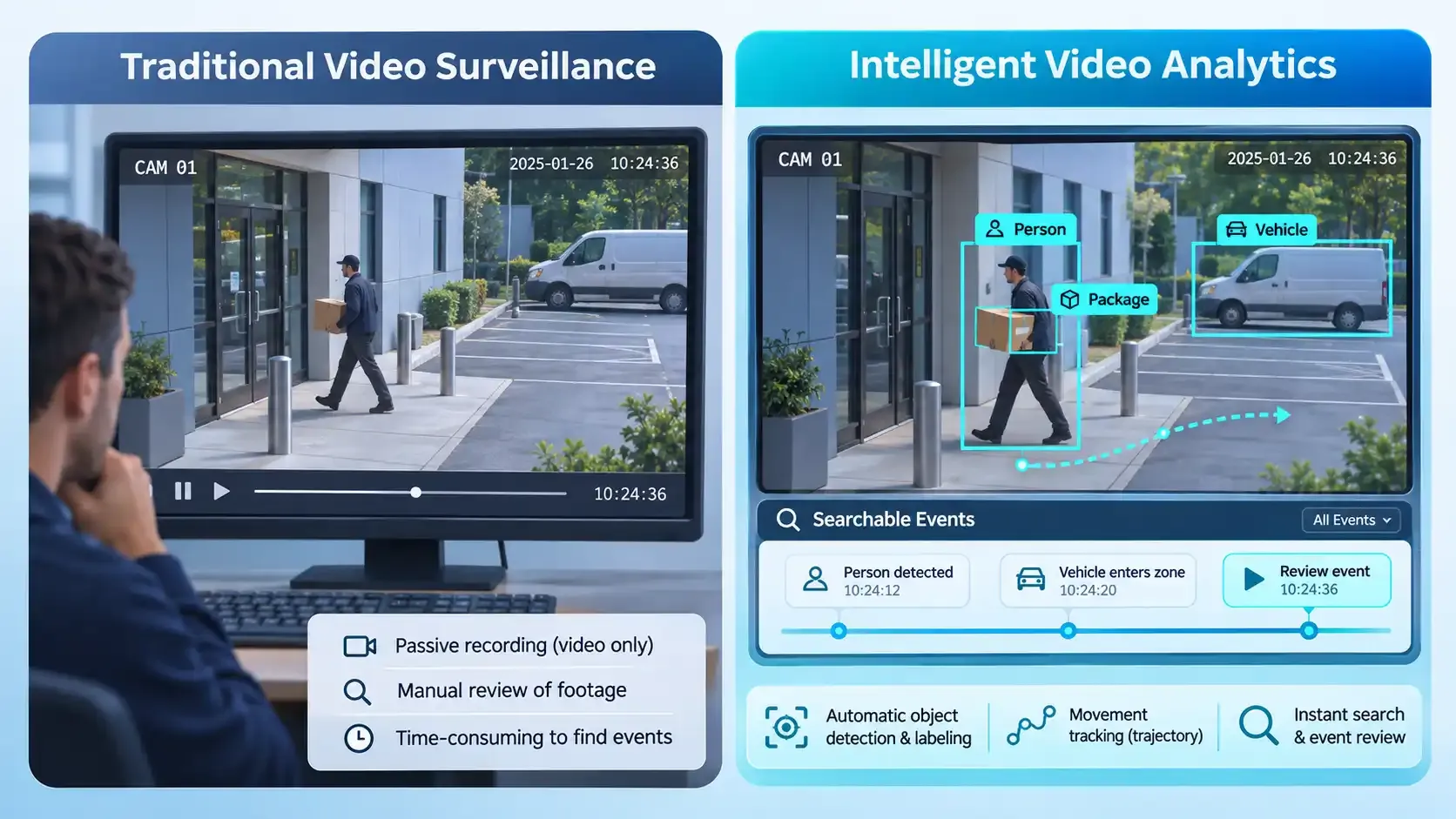
Traditional video surveillance primarily records footage for people to watch later or monitor in real time. Intelligent video analytics adds an analysis layer. Instead of relying entirely on someone watching a screen, software can process video to identify selected objects, movements, or events.
For example, a business might use video analytics to:
- Detect vehicles entering a designated area.
- Track objects as they move through a scene.
- Count people or items in a defined space.
- Identify whether a particular object appears in a video.
- Analyze activity relevant to a specific process.
The exact capabilities depend on the models, data, configuration, and purpose of the system. Not every intelligent video analytics solution supports every task.
The terms AI video analytics, video analytics, and intelligent video analytics are often used in overlapping ways. In general, they describe software that extracts information from video rather than treating footage only as a recording.
Intelligent Video Analytics vs. Traditional Video Surveillance
Traditional video surveillance captures and stores footage; intelligent video analytics adds automated interpretation. The distinction is not whether a camera is digital, but whether software extracts useful information about what appears or happens in the footage.
| Capability | Traditional video surveillance | Intelligent video analytics |
|---|---|---|
| Primary function | Record and display video | Analyze video for defined tasks |
| Finding an event | Often requires manual review | May use searchable metadata and event filters |
| Object identification | Human inspection | Automated detection and classification where supported |
| Movement analysis | Manual observation | Tracking and trajectory analysis where supported |
| Alerts | Basic motion or manually configured triggers | Object-, zone-, or event-specific alerts where supported |
| Limitations | Operator time and attention | Model errors, data quality, configuration, and oversight |
Intelligent analytics does not necessarily require replacing existing cameras. Compatibility depends on camera interfaces, video formats, available computing resources, and integration support.
How Does Intelligent Video Analytics Work?
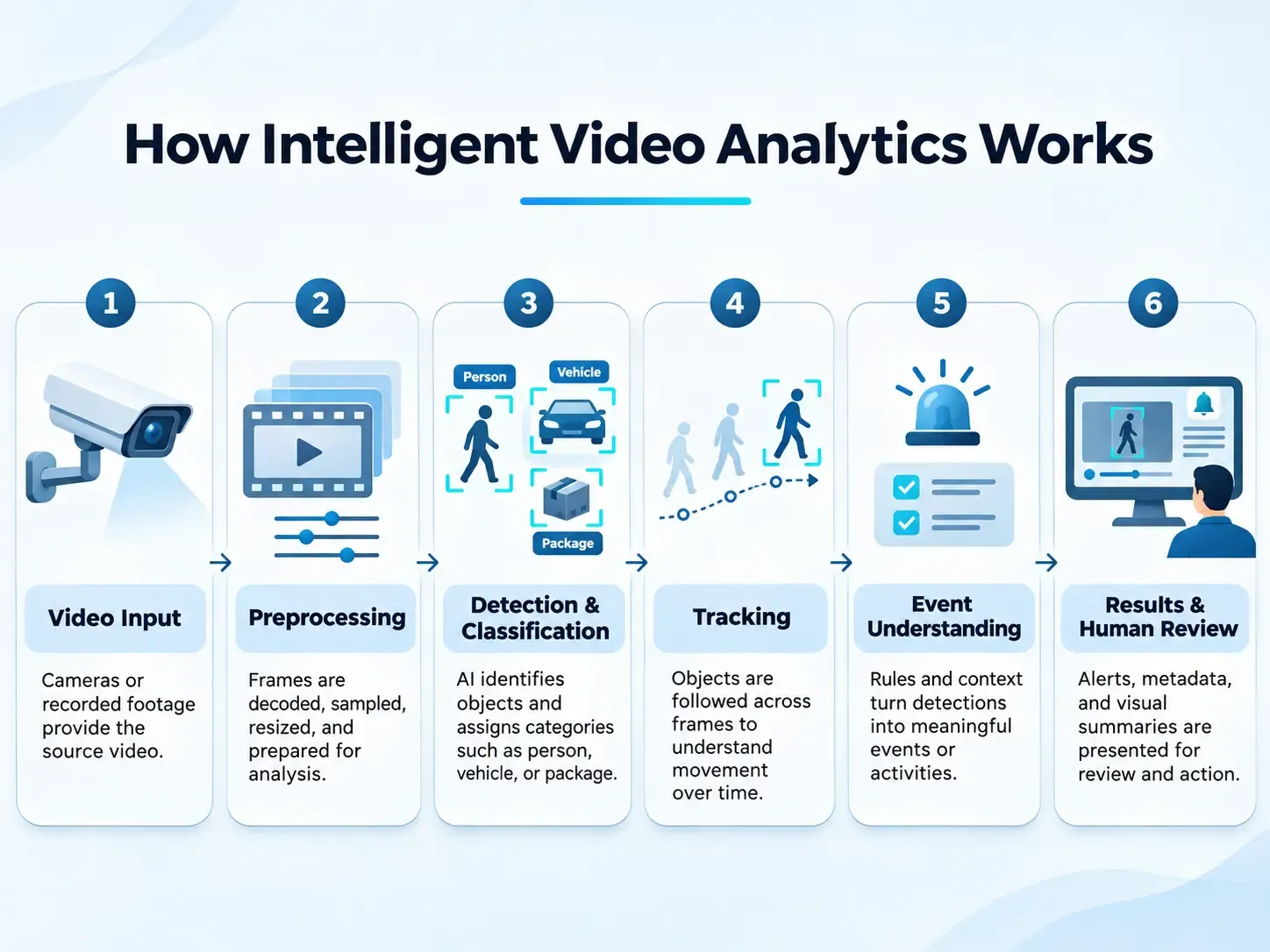
An intelligent video analytics system typically follows a sequence of processing and analysis steps. The precise architecture varies, but the general workflow can be understood through five stages.
1. Video Input and Preparation
The process starts with video data. This may come from recorded files or, in systems designed for it, live video streams.
Before analysis, video may need to be decoded, sampled into frames, resized, or otherwise prepared for the model. The quality and consistency of the input can influence the results.
Factors such as lighting, camera position, motion blur, resolution, and obstruction can make visual information easier or harder to interpret.
2. Object Detection and Classification
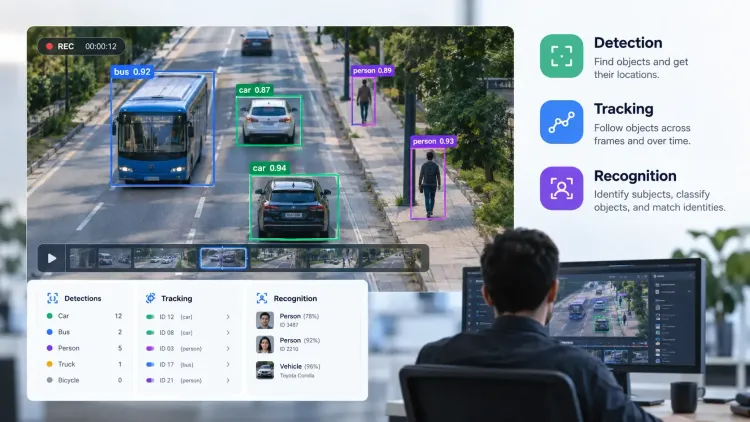
Object detection identifies where selected objects appear in a video frame. A model may locate objects such as people, vehicles, products, or pieces of equipment, depending on what it has been designed or trained to detect.
Classification assigns a category to a detected object. For example, a system might distinguish between a car and a truck.
Detection and classification are related, but they are not identical:
- Detection identifies an object's location in the frame.
- Classification assigns the object to a category.
- Recognition can identify a particular class or target according to the system's capabilities and training.
These outputs provide a foundation for more detailed video analysis.
3. Object Tracking
Detection describes what appears in an individual frame. Tracking connects detections across multiple frames to follow an object's movement over time.
For example, a tracking system may follow a vehicle as it moves across a camera's field of view. It can associate observations from different frames with the same tracked object, helping create a record of its path.
Tracking can support tasks such as movement analysis, object counting, and activity interpretation. However, tracking is not always perfect. Occlusion, crowded scenes, rapid movement, and changes in appearance can make it difficult to maintain an object's identity.
For a deeper explanation, see Prexable's guide to multi-object tracking.
4. Recognition and Activity Analysis
After objects have been detected or tracked, a system may analyze additional information about them or their activity.
Depending on the application, this can involve recognizing selected objects, analyzing movement patterns, or identifying events that match defined criteria.
For example, a system designed for an industrial environment might be configured to identify whether a particular item appears in a monitored area. Another application might analyze movement through a defined space.
More advanced activity analysis can be technically challenging. A single frame may show what is present, but understanding an action often requires information from multiple frames and the context in which movement occurs.
5. Results and Review
The final stage turns model outputs into information that people or other systems can use. Depending on the solution, results may include detections, classifications, tracked paths, event information, or visual summaries.
Human review remains important, particularly when results could influence operational, safety, or security decisions. Analytics should support informed judgment rather than automatically replace it.
A useful system makes it possible to understand what was detected, assess whether the result is relevant, and decide what action, if any, is appropriate.
From Detections to Searchable Events
A detection is not automatically a meaningful event. For instance, detecting a person near a doorway differs from establishing that someone entered a restricted area.
Event logic may combine object identity, tracked movement, a virtual boundary, timestamps, and a rule such as crossing into a zone after closing time. More complex activities require temporal context and may remain ambiguous even with advanced models.
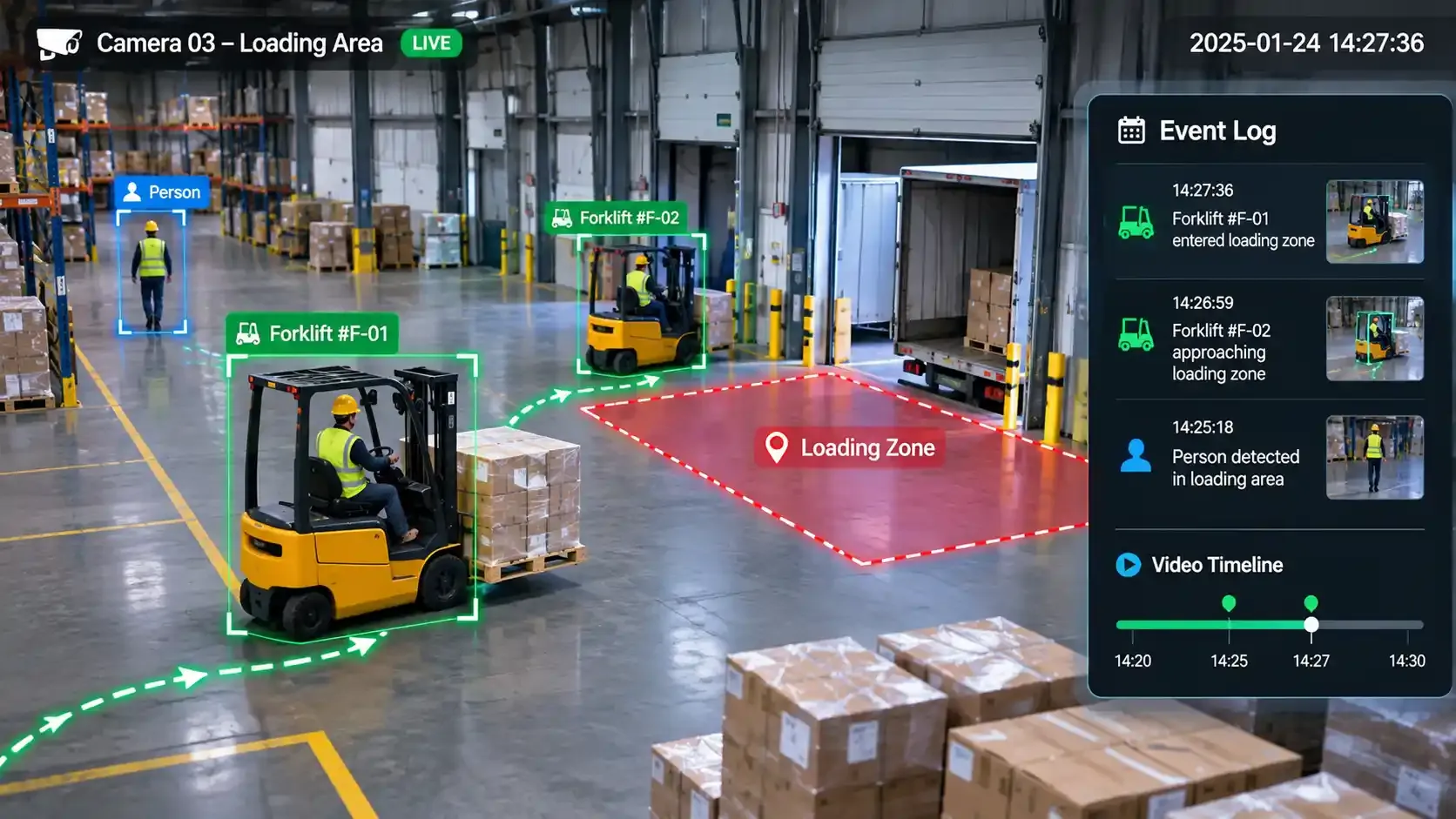
A typical event record can contain a camera identifier, timestamp, object category, confidence score, zone, track identifier, and a link to the relevant footage.
Such metadata can support filtering and investigation, but organizations should validate how events are defined and how errors are handled.
Key Technologies Behind Intelligent Video Analytics
Intelligent video analytics combines several technologies. Their roles overlap, but each contributes a different part of the analysis process.
Computer Vision
Computer vision is the field of technology concerned with enabling computers to interpret visual information. In video analytics, it provides methods for processing images and identifying useful visual features.
Computer vision tasks can include image classification, object detection, segmentation, and tracking. These methods help transform visual data into structured outputs that can be analyzed.
Machine Learning and Deep Learning
Machine learning allows models to learn patterns from data. Deep learning, a subset of machine learning, uses neural networks with multiple layers to learn more complex patterns.
In video analytics, trained models can recognize visual categories or patterns in frames. Their usefulness depends on the quality and relevance of the training data, the model design, and the conditions in which the model is used.
Object Detection and Tracking
Detection and tracking are two core capabilities in many video analytics workflows. Detection identifies objects in frames, while tracking connects observations over time.
Together, they can provide information about what appears in a scene and how it moves.
Prexable covers the practical distinction in its article on choosing video object detection software.
Recognition and Video Understanding
Recognition can help identify objects or categories relevant to a particular task. Broader video understanding aims to interpret relationships, activities, or events across a sequence of frames.
Newer approaches, including vision-language models, explore ways to connect visual information with natural-language descriptions. These approaches have potential applications, but their suitability depends on the task and the reliability required.
For more context, read Vision-Language Models for Video Analytics.
Real-Time Analytics vs. Recorded-Video Analytics
Real-time video analytics processes a live stream to identify relevant activity with a delay appropriate to the use case.
It can support time-sensitive alerts, but real-time performance should be verified against measured end-to-end latency rather than assumed to mean instantaneous processing.
Recorded-video analytics analyzes stored footage to locate objects, movements, or events after capture.
It is often useful for investigations, quality reviews, and historical trend analysis. A platform may support one mode, both modes, or different features in each.
For a deeper discussion, read Prexable's real-time video processing guide.
Common Applications of Intelligent Video Analytics
Intelligent video analytics can be applied wherever visual information helps answer a practical question. The most appropriate use cases depend on the environment, available video data, and the task the system is expected to perform.
Security and Surveillance
Security teams may use video analytics to identify selected objects, monitor movement, or locate events in recorded footage.
Depending on the system, analytics can help prioritize footage for review rather than requiring operators to watch every recording in full.
However, automated detections should be treated as information for review. A model's output does not necessarily establish what happened or why.
Manufacturing and Quality Monitoring
In manufacturing, video can provide information about equipment, products, and activities on a production floor.
A custom video analysis model could be developed for a defined visual task, such as identifying whether a particular item is present or detecting a visible condition.
The feasibility of each application depends on the available footage, the definition of the target, and how the model performs under actual production conditions.
Retail and Customer-Flow Analysis
Retail environments may use video analysis to understand movement through a store or monitor activity in selected areas.
Depending on the system, potential tasks include counting objects or people, analyzing movement patterns, and identifying activity in defined zones.
Organizations should consider privacy requirements and whether the intended analysis is proportionate to the business need.
Transportation and Traffic Monitoring
Video analytics can support the analysis of vehicles and movement in transportation environments.
Potential applications include vehicle detection, traffic counting, and tracking movement through a monitored area.
Performance can vary with weather, lighting, camera placement, traffic density, and other environmental conditions. Systems should be evaluated using footage that reflects the intended deployment environment.
Workplace and Operational Monitoring
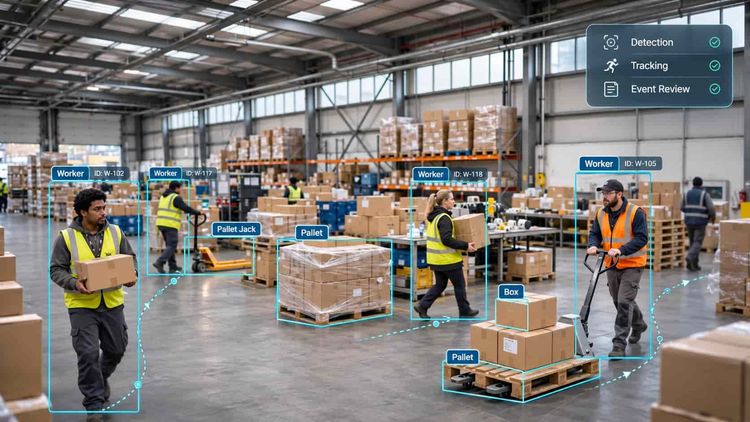
Some organizations may use video analytics to understand activity in workplaces, warehouses, or other operational environments.
For example, a system might be designed to detect selected equipment or track objects through a defined process.
The goal should be a clearly specified operational question rather than collecting visual information without a defined purpose.
Example: Turning a Warehouse Video into an Actionable Review
Consider a warehouse team that wants to review vehicle movement near a loading zone.
A suitable analytics workflow could detect forklifts, track their movement, and flag tracks that cross a defined boundary.
Reviewers could then inspect the relevant clips instead of scanning an entire shift.
This is an illustrative workflow, not a claim that every platform can detect unsafe behavior or determine responsibility. The team would still need representative testing, a clear alert policy, and human review.
Benefits of Intelligent Video Analytics
When selected and configured for an appropriate task, intelligent video analytics can offer several practical benefits.
More Efficient Video Review
Automated analysis can help identify relevant objects or sections of footage, reducing the need to search through every frame manually.
The extent of this benefit depends on the quality of the analytics and how well the task is defined.
More Structured Information
Video is primarily visual data. Analytics can convert parts of that information into structured outputs, such as object categories, locations, or tracked movement.
Structured outputs can make it easier to compare observations or use video information in a wider workflow.
Analysis Tailored to Specific Use Cases
Not every organization needs to detect the same objects or analyze the same activities.
Custom-trained models can be developed for more specific visual tasks when general-purpose capabilities do not fit the requirement.
The quality of a custom model still depends on appropriate training data, evaluation, and ongoing review.
Better Visibility into Visual Processes
Video analysis can help teams examine activities that may be difficult to understand from isolated images or manual observations alone.
Tracking and activity analysis can add information about how objects move and interact over time.
The benefit comes from answering a useful question more effectively, not simply from applying AI to video.
Where Intelligent Video Analytics Runs: Edge, On-Premises, and Cloud
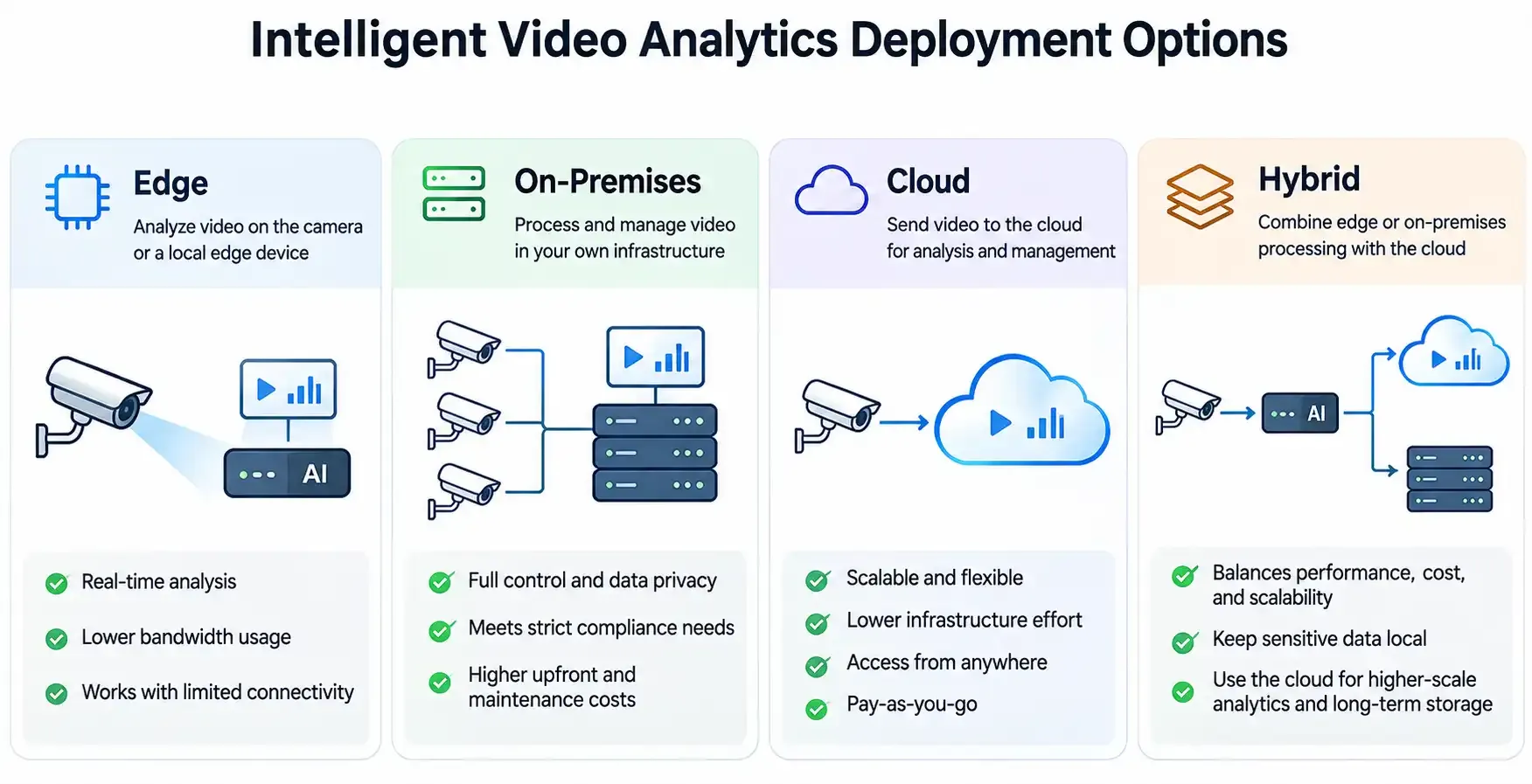
The location of processing affects latency, bandwidth, maintenance, cost, and data governance.
These are deployment options, not capabilities that should be assumed for every vendor.
| Deployment | How it works | Potential advantages | Trade-offs |
|---|---|---|---|
| Edge | Processing on or near a camera | Lower upstream bandwidth and potentially faster local response | Limited compute and device-management complexity |
| On-premises server | Streams processed on local servers | Central control of local infrastructure | Hardware procurement, capacity planning, and maintenance |
| Cloud | Video or selected frames sent to hosted computing resources | Flexible centralized processing and administration | Connectivity, transfer costs, data residency, and latency considerations |
| Hybrid | Workloads split across locations | Flexibility to balance local response and centralized analysis | More complex architecture and governance |
Before selecting a deployment, calculate expected camera count, resolution, frame sampling rate, concurrent models, storage retention, network throughput, and acceptable alert latency.
Confirm compatibility with the existing video management system (VMS) and camera interfaces.
Read more about edge video processing.
Challenges and Limitations of Intelligent Video Analytics
Intelligent video analytics can be useful, but it is not a guarantee of accurate interpretation. Understanding its limitations is essential before relying on results.
Video Quality and Environmental Conditions
Poor lighting, low resolution, camera movement, reflections, obstructions, and unusual viewing angles can affect what a model can detect.
A model that performs well on one dataset or in one environment may perform differently under other conditions. Testing should use representative footage whenever possible.
Model Accuracy and False Detections
Models can miss relevant objects or identify something incorrectly.
These errors may be influenced by training data, object appearance, scene complexity, and the conditions in which the model operates.
Evaluation should consider both missed detections and false positives. A system should be assessed against the requirements of the intended task rather than relying on a general claim of accuracy.
Privacy and Responsible Data Handling
Video can contain personal or sensitive information.
Organizations should establish a clear purpose for collecting and analyzing footage and consider applicable privacy and data-protection requirements.
Important questions include:
- What video data is collected?
- Who can access the footage and analysis results?
- How long is information retained?
- Is the analysis necessary for the stated purpose?
- Are people informed where required?
- What controls are available for managing data?
Privacy should be considered during system selection and design, not only after deployment.
For additional context, see Prexable's articles on AI privacy issues and challenges and privacy-preserving video.
Transparency and Human Oversight
Users should be able to understand what a model is intended to detect and how its outputs should be interpreted.
This is particularly important when analysis informs decisions that affect people, operations, or safety.
Human review can help identify mistakes, provide context, and prevent model outputs from being treated as unquestionable facts.
How to Measure Whether Video Analytics Works
Avoid treating a single vendor-reported accuracy number as proof of suitability.
Evaluate the system on footage that reflects the actual cameras, lighting, weather, object sizes, and scene density.
Important evaluation metrics include:
- Precision: Of the detections reported, what proportion are correct? Low precision can create excessive false alerts.
- Recall: Of the relevant objects or events present, what proportion are found? Low recall means missed detections.
- False alarms per camera-hour: How frequently will operators need to inspect irrelevant alerts?
- End-to-end latency: How long does it take from an event occurring to an alert becoming available?
- Tracking quality: Does the system maintain consistent tracks when objects overlap, leave the frame, or reappear?
- Operational measures: How much reviewer time is saved, and what are the infrastructure and maintenance costs?
Metrics must match the task. Object-detection precision is not the same as event-detection precision, and tracking needs its own evaluation.
Record performance by camera and environmental condition, not only as one aggregate score.
Set acceptable thresholds before running a pilot.
For common failure modes, see When AI Sees Wrong.
What to Look for in Intelligent Video Analytics Software
Choosing intelligent video analytics software starts with defining the problem.
A platform with many features is not necessarily the best choice if it does not support the task that matters to your organization.
Consider the following criteria.
| Evaluation area | Questions to ask |
|---|---|
| Detection | Can it identify the objects relevant to your use case? |
| Tracking | Can it follow objects across frames when needed? |
| Recognition | Does it support the recognition task you require? |
| Customization | Can models be trained or adapted for specific requirements? |
| Usability | Can the intended users work with the platform without unnecessary technical complexity? |
| Transparency | Can users inspect and understand model outputs? |
| Data control | Are data handling and access arrangements clear? |
| Evaluation | Can you test the system using representative footage before relying on it? |
It is also important to distinguish between a platform's advertised capabilities and the capabilities that have been demonstrated for your particular task.
Before selecting a solution, define what success means.
For example, a team might need to detect a particular object, track it through a scene, or recognize a specific visual category.
Each requirement may need a different model and evaluation approach.
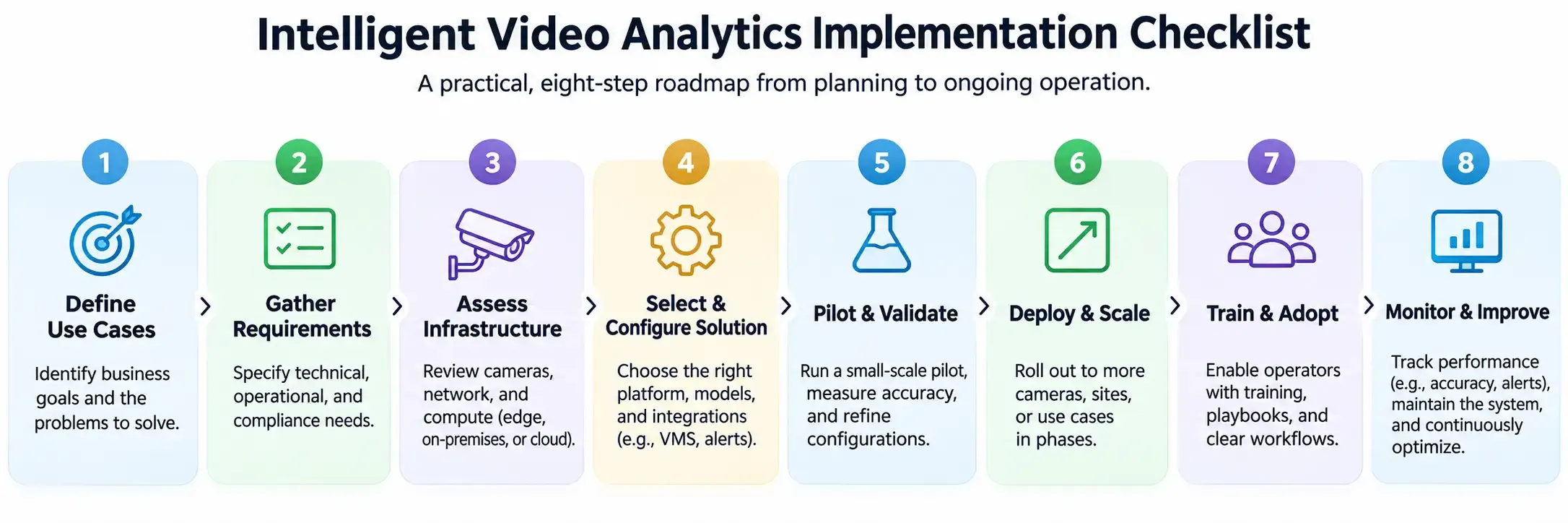
How to Implement Intelligent Video Analytics: A Practical Checklist
- Define the decision: Specify the object or event to detect and what someone will do with the result.
- Audit available footage: Check camera angles, image quality, coverage, frame rate, and lawful data access.
- Choose the analysis mode: Decide whether live alerts, batch analysis, or both are necessary.
- Select a deployment architecture: Assess edge, local-server, cloud, or hybrid processing against real infrastructure constraints.
- Prepare representative examples: Include ordinary conditions and difficult cases, not only ideal footage.
- Run a controlled pilot: Measure precision, recall, false alerts, latency, and reviewer workload.
- Design the human workflow: Define who reviews alerts, what evidence they see, and how corrections are logged.
- Monitor after launch: Reassess performance when camera positions, lighting, environments, or operational requirements change.
Teams needing specialized object categories may benefit from Prexable's guide to training a custom object detection model.
For tasks involving sequences of actions, see From Tracking Objects to Understanding Events.
How Prexable Supports Custom Video Analysis
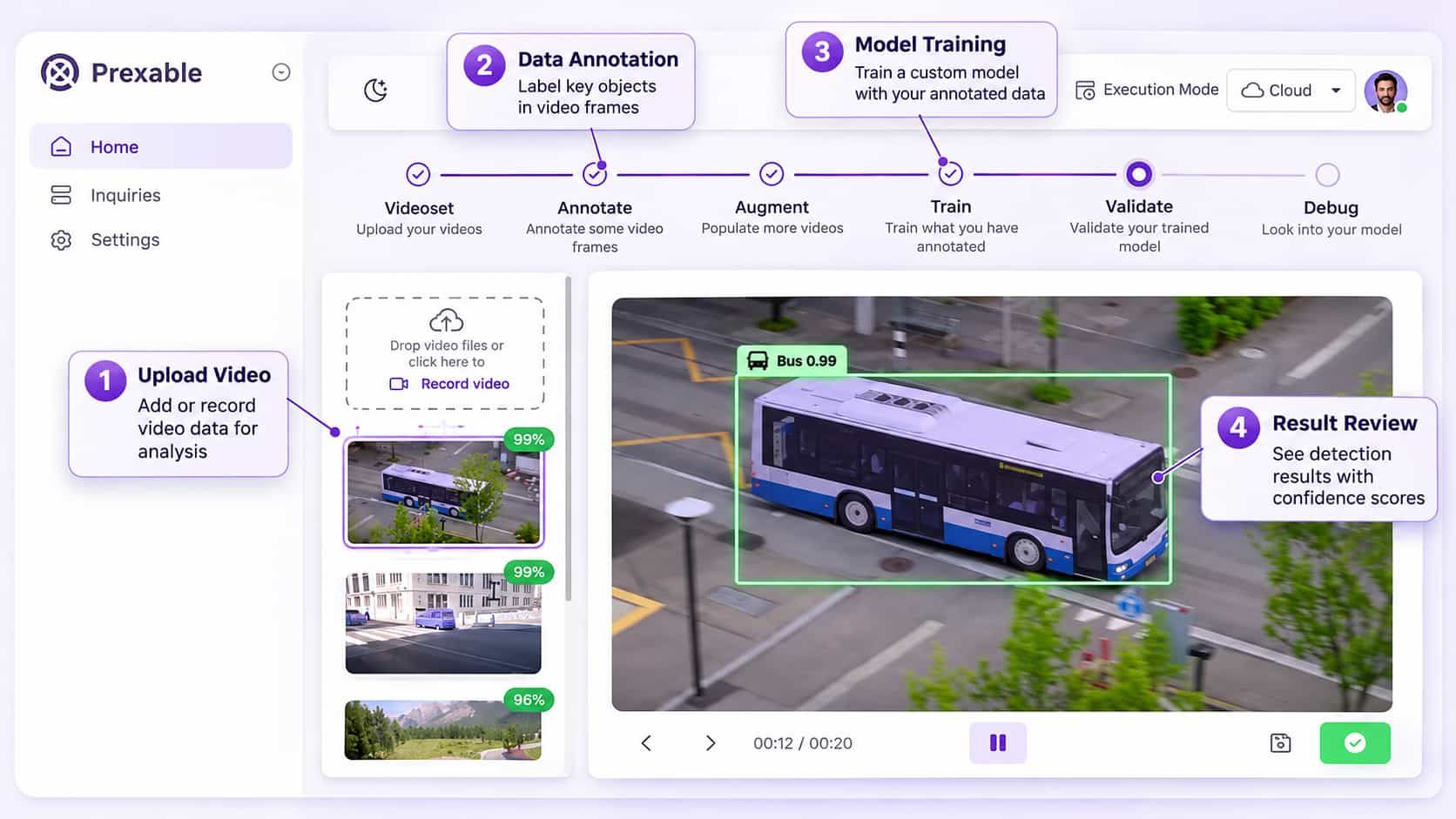
Prexable is a web-based video analysis platform designed to help users train and understand AI models for their own use cases without requiring extensive AI expertise.
The platform brings three core capabilities together in one interface:
- Detection: Identify objects or targets in video.
- Tracking: Follow objects as they move through video.
- Recognition: Identify relevant visual categories or targets.
Its general workflow is:
- Upload: Provide video for the intended analysis.
- Train: Train a custom AI model for the use case.
- Analyze: Use the model to analyze video.
- Review: Examine the analysis results.
This approach is relevant for organizations that need video analysis tailored to a particular visual task rather than relying only on predefined, general-purpose use cases.
Prexable also emphasizes privacy, transparency, and user control over data.
As with any video analytics platform, organizations should evaluate the specific data-handling arrangements and capabilities against their own requirements.
To learn more about the platform, visit Prexable.
Frequently Asked Questions
What Is Intelligent Video Analytics?
Intelligent video analytics is the use of AI and computer vision to automatically analyze video.
Depending on the system, it can detect and classify objects, track movement, recognize selected targets, and identify relevant events or activities.
How Does Intelligent Video Analytics Work?
A typical workflow involves acquiring video, preparing frames for analysis, detecting and classifying objects, tracking them across frames, and interpreting the resulting information.
The system then presents outputs for review or further use.
What Is the Difference Between Video Analytics and Intelligent Video Analytics?
The terms are often used interchangeably.
Intelligent video analytics generally emphasizes the use of AI and computer vision to interpret video, while video analytics can also refer more broadly to automated techniques for extracting information from footage.
What Are Common Applications of Intelligent Video Analytics?
Applications can include security and surveillance, manufacturing, retail, transportation, and workplace operations.
The appropriate capabilities depend on the task, the video data, and the environment.
What Should Businesses Look for in Intelligent Video Analytics Software?
Businesses should assess detection, tracking, recognition, customization, usability, transparency, data control, and the ability to evaluate results using representative footage.
The most important criteria are those directly related to the intended use case.
Can Intelligent Video Analytics Use Custom-Trained AI Models?
Yes. Some platforms support training or adapting models for specific visual tasks.
Custom training can help address requirements that general-purpose models do not meet, but results depend on the quality of the training data and how the model is evaluated.
Does Intelligent Video Analytics Work with Existing CCTV Cameras?
Sometimes.
Compatibility depends on the camera's video output, network access, codecs, the analytics platform's supported inputs, and available computing resources.
Confirm support with a pilot before assuming an existing camera network can be reused unchanged.
Is Intelligent Video Analytics the Same as Facial Recognition?
No.
Facial recognition is a distinct biometric capability that some systems may offer.
Many video analytics tasks, such as counting vehicles or tracking equipment, do not require identifying people.
Biometric processing can introduce additional legal and privacy obligations.
What Is the Difference Between Object Detection and Event Detection?
Object detection identifies what appears in an image or frame.
Event detection evaluates whether a defined occurrence has happened, often using movement, time, zones, or multiple frames.
A detected person is not, by itself, proof of trespassing or another event.
Can Intelligent Video Analytics Run at the Edge?
Yes, some solutions run inference on cameras or nearby devices.
Whether edge processing is suitable depends on model size, device capacity, power, maintenance, and the required response time.
Conclusion
Intelligent video analytics turns video footage into information that can support specific business and operational tasks.
By combining computer vision, machine learning, detection, tracking, and recognition, these systems can help organizations examine visual data more systematically.
The right solution depends on the problem being addressed.
Businesses should consider the required capabilities, the quality of available footage, model performance, privacy, transparency, and the need for human review.
For organizations exploring custom video analysis, Prexable brings detection, tracking, recognition, and custom model training together in a web-based platform.
Learn more at Prexable.
References and Further Reading
The following sources provide additional technical and industry context. Vendor examples describe possible capabilities, not features guaranteed by every platform.
- Milestone Systems — What Is Intelligent Video Analytics Software? — Industry overview, deployment considerations, and evaluation guidance.
- Hanwha Vision — Intelligent Video Analytics: Benefits and Use Cases — Video processing, event alerts, and operational applications.
- NIST — AI Risk Management Framework — Guidance on AI trustworthiness, evaluation, and risk management.
- Prexable — Multi-Object Tracking — Background on tracking objects across frames.
- Prexable — Privacy-Preserving Video — Privacy considerations in video analysis.
Working with video data?
See how Prexable can detect, track and explain what happens in your footage.
Talk to our team