How to Choose Video Analysis Software for Detection, Tracking, and Recognition
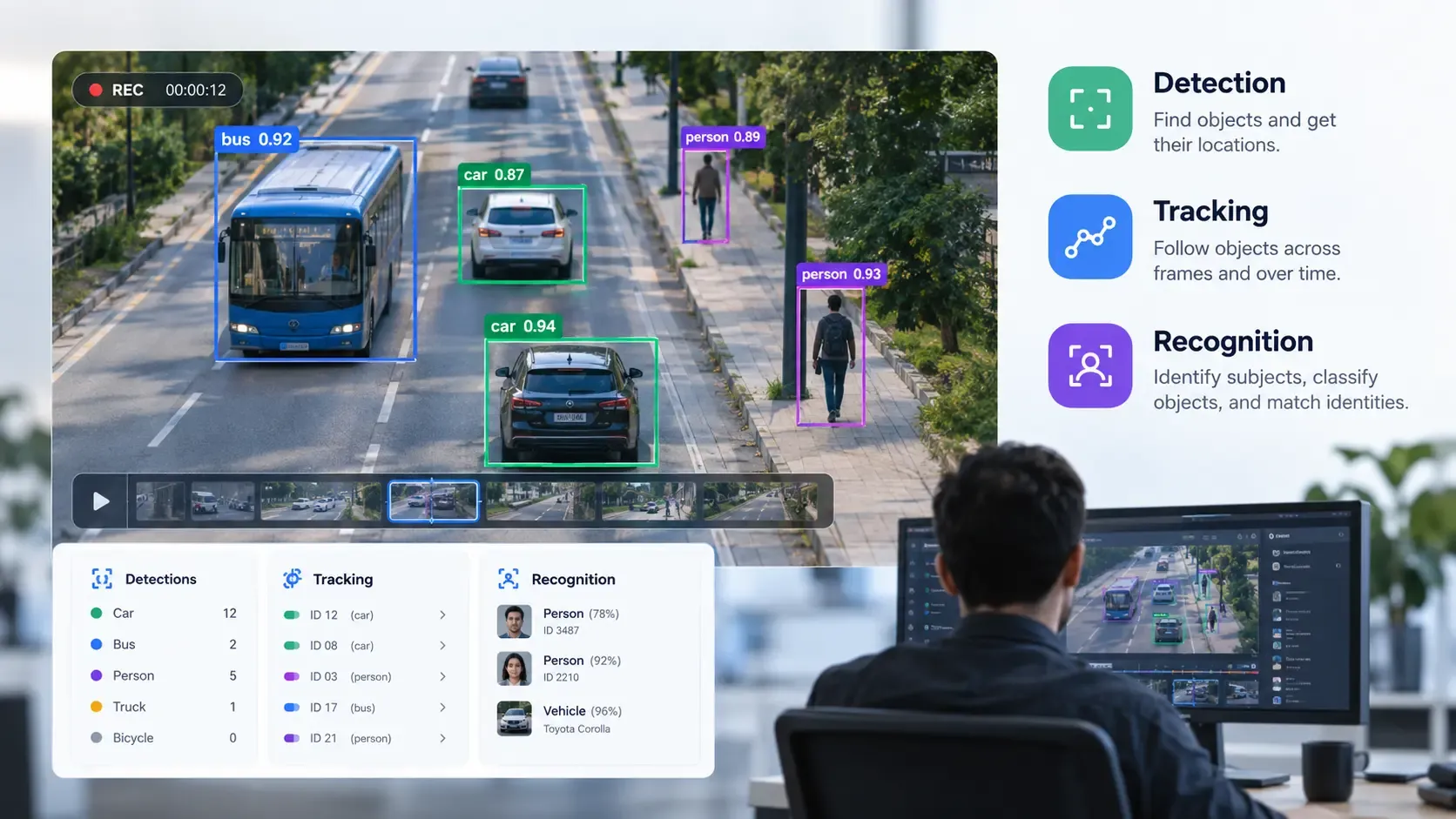
Video contains information that can be difficult to extract manually. Whether you need to count objects, follow movement, identify specific subjects, or review large amounts of footage, video analysis software can help turn visual data into structured information.
However, choosing the right platform requires more than comparing feature lists. Different tools support different computer vision tasks, video formats, processing environments, and levels of customization. A solution that works well for one project may not meet the requirements of another.
This guide explains how to evaluate video object detection software and broader video analysis platforms, so you can select a solution that fits your data, technical resources, and business objectives.
What Is Video Analysis Software?
Video analysis software uses computer vision, machine learning, or related technologies to extract information from video. Depending on the platform, it may identify objects, track movement, classify visual content, recognize specific subjects, or generate annotations for further analysis.
Applications range from industrial inspection and research to security, retail analytics, robotics, and environmental monitoring.
Some platforms provide ready-to-use models for common tasks. Others let users configure existing models, train custom models, or integrate video processing into their own applications.
Before comparing products, identify the specific outcome you need. For example, counting objects in a production line requires different capabilities from identifying a particular person or tracking an animal across several minutes of footage.
Understand the Three Core Video Analysis Capabilities
Detection, tracking, and recognition are related, but they solve different problems. Understanding these differences helps you evaluate whether a platform supports your complete workflow.
1. Object Detection
Object detection identifies objects within an image or video frame and estimates their locations. Results commonly include object labels, confidence scores, and bounding boxes.
For example, an industrial inspection system might detect products moving along a conveyor belt. A research team might use detection to identify animals appearing in recorded footage.
When evaluating object detection software, consider:
- Supported object categories: Can the model identify the objects relevant to your project?
- Detection accuracy: How well does it perform on your actual footage?
- Environmental conditions: Does performance remain acceptable under different lighting, camera angles, and levels of occlusion?
- Processing speed: Can it handle your required video volume or frame rate?
- Customization: Can you adapt the model when standard categories are insufficient?
A tool that detects common objects may not automatically recognize specialized equipment, unusual defects, or categories unique to your business. Test the capabilities you actually need rather than relying on general demonstrations.
2. Object Tracking
Object tracking follows detected objects across successive frames. Depending on the system, it can associate observations with individual tracks and provide information about their locations over time.
Consider a video containing several vehicles. Detection can identify vehicles in individual frames, while tracking attempts to maintain a consistent track for each vehicle as it moves through the scene.
Tracking is useful when your project depends on movement, duration, paths, or changes in position.
When comparing tracking tools, examine:
- Track consistency: Does the system maintain object identities as objects move?
- Occlusion handling: What happens when an object temporarily disappears behind another object?
- Multiple-object support: Can it track several objects simultaneously?
- Camera movement: Does performance meet your needs when the camera moves?
- Output format: Can you access timestamps, coordinates, track identifiers, or other required results?
Tracking performance depends on the footage, the objects, and the selected model. Do not assume that every platform will maintain identity reliably in crowded or difficult scenes.
For a deeper explanation, see Prexable's guide to multi-object tracking.
3. Object and Subject Recognition
Recognition involves determining the identity, category, or attributes of a subject, depending on the system and its capabilities. The term can refer to several different tasks, including classification, face recognition, and matching an observed object against known examples.
For example, a system might classify an item as a particular product category or attempt to match a visible subject to a known identity.
Before choosing recognition software, clarify exactly what you mean by recognition.
Ask whether the platform supports the required categories, custom identities, reference data, or recognition methods. Also consider false matches, confidence thresholds, and the consequences of incorrect results.
Recognition is not a single universal feature. A tool that classifies objects into broad categories may not support identity matching or specialized recognition tasks.
Why Combining These Capabilities Matters
Some projects require only one capability. Others benefit from a workflow that combines detection, tracking, and recognition.
For example, a video analysis workflow might:
- Detect objects in each frame.
- Track selected objects across frames.
- Classify or recognize those objects when the required capability is available.
- Organize the results for review or further processing.
A unified interface can make these steps easier to manage, but verify whether the platform actually supports your required workflow. Having three feature names in a product description does not necessarily mean every combination is available or performs equally well.
How to Evaluate Video Analysis Software
Once you understand the required capabilities, compare candidate platforms against a consistent set of criteria.
1. Test Accuracy on Your Own Footage
Model performance on a vendor demonstration may not represent performance in your environment.
Video resolution, lighting, object size, camera position, motion blur, and occlusion can all affect results. A model trained on one type of footage may also perform differently on another.
Prepare a representative test set containing typical scenarios and difficult cases. Where possible, compare automated results against manually verified ground truth.
Choose metrics that match the task. Detection may require precision, recall, and a measure of bounding-box overlap. Tracking may require measures of identity consistency and track accuracy. Recognition may require evaluating false positives and false negatives.
Do not rely on a single accuracy percentage without understanding how it was calculated and whether the test data represents your use case.
2. Check Customization and Model Training
Pretrained models can be a convenient starting point, but your project may involve objects, categories, or conditions that standard models do not handle adequately.
Determine whether you can:
- Use existing models without training.
- Fine-tune or train models with your own data.
- Import custom models.
- Adjust confidence thresholds and other relevant settings.
- Review and correct annotations.
- Test model changes before deployment.
Also check the expertise required. Some platforms expect users to write code and configure infrastructure, while others provide visual workflows.
If your team lacks dedicated AI engineers, usability and model-management tools may be important selection criteria.
3. Evaluate Ease of Use and Workflow Integration
A technically capable platform may still be unsuitable if it requires too much manual effort.
Review how users upload or access video, configure processing, inspect results, and export data. Determine whether the software supports your preferred workflow or requires substantial custom development.
For technical teams, APIs, SDKs, and integration options may be essential. For nontechnical users, a clear interface and accessible configuration tools may matter more.
Ask how results can be exported and whether they can be integrated with the systems your team already uses.
4. Compare Cloud, On-Premises, and Edge Processing
Video processing can take place in different environments, and each option involves trade-offs.
Cloud processing can reduce the need to manage local computing infrastructure. However, you should evaluate data transfer, recurring costs, connectivity, and the provider's data-handling terms.
On-premises processing can offer greater control over infrastructure and data flows, but your organization must manage hardware, updates, security, and maintenance.
Edge processing runs analysis near the camera or data source. It can reduce the need to transmit raw footage and may help meet latency requirements, although available hardware and model size can limit performance.
The right choice depends on your data sensitivity, latency requirements, deployment environment, technical resources, and budget.
Do not assume that a product supports every deployment model. Verify the available options with the vendor.
5. Review Privacy, Security, and Data Ownership
Video can contain personal information, confidential business activity, or sensitive operational details.
Before uploading footage, investigate:
- Where videos and derived results are stored.
- Who can access uploaded data.
- How long data is retained.
- Whether data may be used to train or improve models.
- How deletion and access controls work.
- What contractual and regulatory requirements apply.
A privacy statement alone is not enough to establish that a solution meets your requirements. Review the relevant documentation and agreements, especially if the footage contains identifiable people or regulated information.
For additional context, read Prexable's article on privacy-preserving video.
6. Calculate Total Cost, Not Just the Starting Price
The cost of video analysis software can include more than a subscription or license.
Consider video storage, processing time, computing resources, model training, annotation, integration, support, and ongoing maintenance. Also estimate how costs change as your video volume or number of users grows.
A lower-priced platform may require substantial engineering effort. A more expensive service may reduce implementation work but introduce usage-based processing costs.
Where possible, estimate the cost of processing a representative volume of video and compare solutions over the expected project lifetime.
7. Check Scalability and Operational Requirements
A tool that handles a small test dataset may not meet production requirements.
Estimate the number and length of videos you expect to process, required turnaround times, number of concurrent streams, and storage needs.
For real-time applications, measure end-to-end latency under realistic conditions. For batch processing, evaluate throughput and how long it takes to complete a typical workload.
Also ask how the platform handles failures, monitoring, model updates, and changes in workload. These factors can become important as a proof of concept develops into a production system.
How to Test a Video Analysis Platform Before Choosing It
A structured evaluation can reveal limitations before you commit to a product.
Step 1: Define the Required Outcome
Write down the result you need, such as counting products, tracking vehicles, identifying a specific category, or generating annotations for a research project.
Avoid starting with a feature list alone. Define what successful analysis should produce.
Step 2: Prepare Representative Video Samples
Select footage that reflects your real conditions, including ordinary scenarios and challenging examples.
Check that you have the necessary rights and permissions to use the footage for testing.
Step 3: Define Evaluation Metrics
Determine how you will measure success. Depending on the task, you might evaluate detection precision and recall, tracking consistency, recognition errors, processing time, or the amount of manual correction required.
Set acceptable thresholds before comparing platforms.
Step 4: Run the Same Test Across Candidate Tools
Use comparable input data and evaluation methods. Record performance, setup effort, processing costs, and any limitations encountered.
Where possible, separate the quality of the model from the usability of the surrounding software.
Step 5: Review the Results With End Users
Ask the people who will use the output whether it is accurate, understandable, and useful for their actual work.
A technically strong result may still require too much correction or fail to provide the information users need.
Step 6: Confirm Deployment and Support Requirements
Before selecting a platform, verify pricing, data-handling terms, integration requirements, available support, and the deployment options that apply to your project.
The result should be a documented comparison based on evidence rather than marketing claims.
Common Mistakes When Choosing Video Analysis Software
Avoid these common selection errors:
- Choosing by feature count alone: More features do not necessarily mean better performance for your task.
- Assuming detection includes tracking: Detecting an object in each frame does not guarantee consistent tracking across frames.
- Treating recognition as one universal capability: Classification, face recognition, and identity matching have different requirements.
- Testing only ideal footage: Real-world conditions may produce different results from clean demonstrations.
- Ignoring integration costs: Custom development and data preparation can significantly affect project cost.
- Overlooking privacy requirements: Data storage, access, retention, and permitted uses should be evaluated before uploading footage.
- Scaling before validating: Test representative workloads and acceptable error rates before committing to a large deployment.
Frequently Asked Questions
What is the difference between video analysis and video surveillance software?
Video analysis software extracts information from video, such as object locations, movement, classifications, or annotations. Video surveillance software typically focuses on monitoring cameras, managing footage, and supporting security operations. Some products combine both types of functionality, but their primary purposes differ.
Do I need coding skills to use video analysis software?
Not always. Some platforms provide visual interfaces for uploading videos, configuring models, and reviewing results. Other solutions are designed for developers and require programming, API integration, or infrastructure management. Check the actual workflow before selecting a product.
Can video analysis software detect and track multiple objects?
Yes, some systems support detecting and tracking multiple objects in the same video. However, performance depends on the model, video conditions, object density, and the platform's capabilities. Test the system using footage that represents your intended application.
How do I evaluate the accuracy of an AI video analysis tool?
Use representative video samples with manually verified reference results. Choose task-specific metrics, compare the automated outputs with those references, and inspect errors across different conditions. A meaningful evaluation should also account for processing speed and the amount of human correction required.
Is cloud-based video analysis better than local processing?
Neither approach is universally better. Cloud services can reduce local infrastructure requirements, while on-premises and edge solutions can provide different levels of control, connectivity dependence, and latency. Compare them against your project's security, performance, operational, and budget requirements.
Can one platform support detection, tracking, and recognition?
Some platforms bring several computer vision capabilities into one interface. However, supported tasks, model availability, and workflows vary. Confirm that the platform provides the specific forms of detection, tracking, and recognition you need, and test them on your own data.
Choose Software Based on Your Actual Video-Analysis Needs
The best video analysis software is the one that reliably produces the results your project requires within your technical, operational, and budget constraints.
Start by defining your use case. Then evaluate detection, tracking, and recognition separately, test accuracy on representative footage, review customization and deployment options, and calculate the full cost of implementation and operation.
If you want to explore a unified approach to video processing, visit Prexable to learn about its detection, tracking, and recognition capabilities. Confirm current feature availability and suitability for your specific project before making a decision.