How to Train a Custom Object Detection Model for Video?
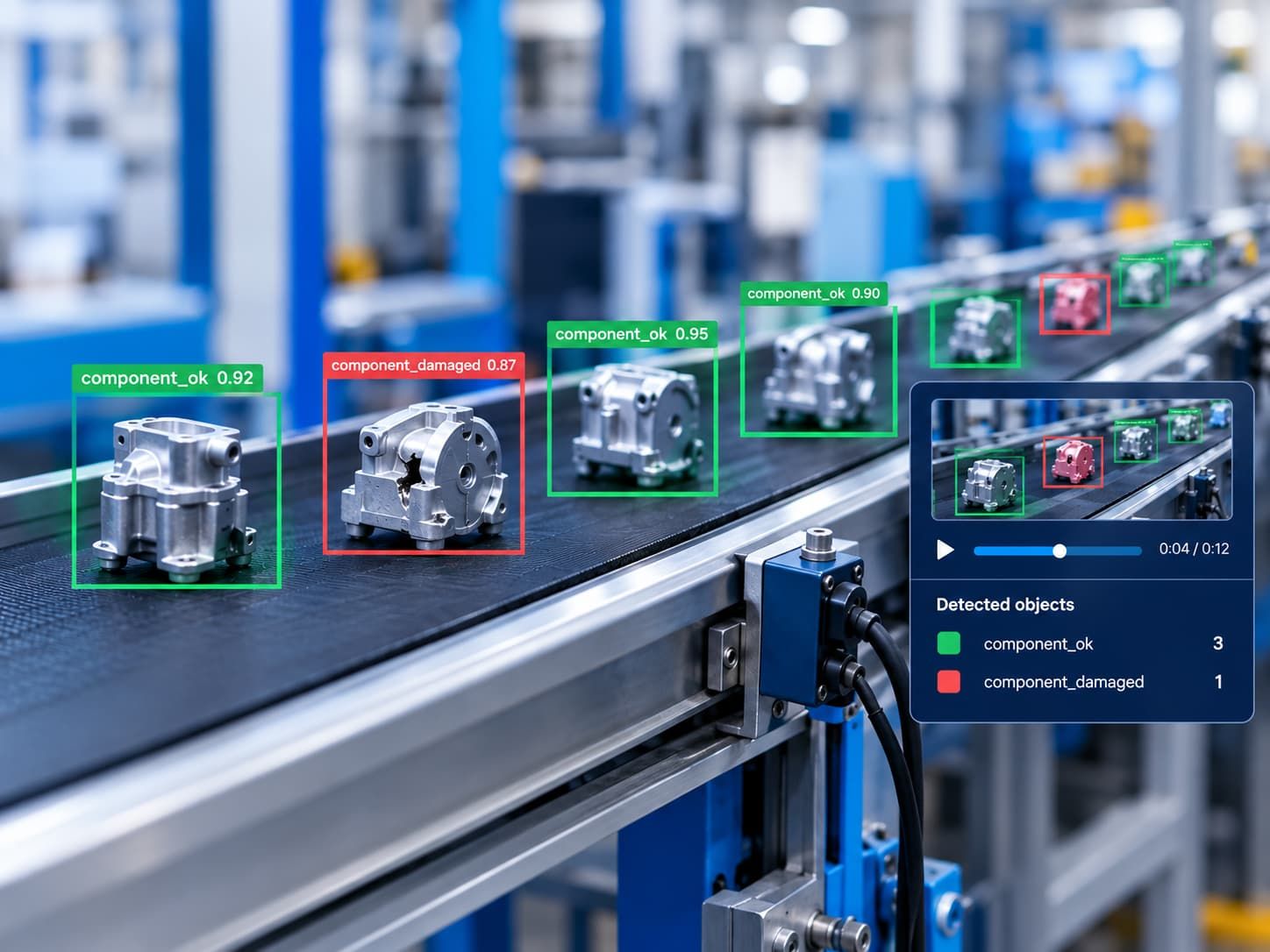
Object detection models can identify and locate objects in images and video, but a general-purpose model may not recognize every object or perform well in every environment. If you need to detect a specific product, component, vehicle, or other object in your own footage, a custom object detection model may be worth exploring.
Training a custom model involves more than selecting an AI algorithm. You need to define the problem, prepare representative video data, label objects consistently, choose an appropriate training approach, and evaluate the results on footage the model has not seen before.
This guide explains how to train a custom object detection model for video, assess whether it meets your requirements, and identify the factors to consider before using it in a real-world workflow.
What Is Custom Object Detection?
Object detection is a computer vision task that identifies objects in an image and estimates their locations, typically using bounding boxes and class labels. Many object detectors also provide confidence scores for their predictions.
A custom object detection model is trained or adapted to recognize object categories relevant to a particular use case.
For example, a business might want to detect:
- Specific components moving along a production line.
- Packages passing through a sorting area.
- Vehicles entering a defined location.
- Products displayed on shelves.
- Particular tools or pieces of equipment in recorded footage.
The model's suitability depends on the objects, training data, video conditions, and intended application. Custom training does not automatically guarantee better results than an existing model.
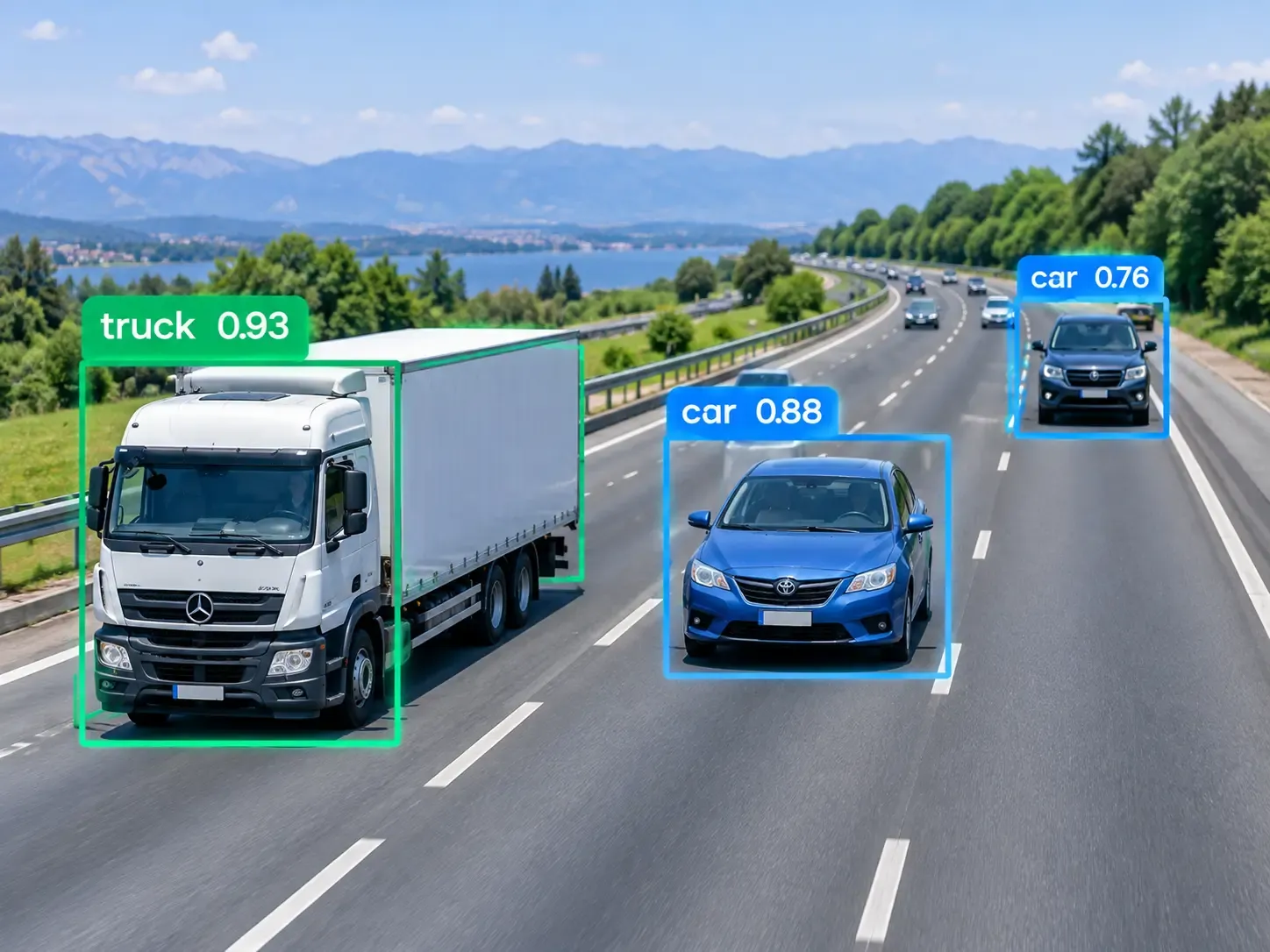
Detection, Tracking, and Recognition: What's the Difference?
These terms describe related but distinct computer vision tasks.
- Object detection identifies objects and their locations in individual frames.
- Object tracking associates detections across successive frames to follow objects over time.
- Object recognition is a broader term for identifying what an object is. In some applications, it means distinguishing specific instances, such as a particular product or item.
If your goal is to count objects passing through a camera, detection may be only the first step. You may also need tracking and counting logic to avoid counting the same object repeatedly.
To evaluate how reliably a tracking system detects objects and maintains their identities over time, explore the HOTA metric for multi-object tracking.
Step 1: Define the Detection Problem
Before collecting data or training a model, describe exactly what you want it to detect and what a successful result looks like.
Start by answering four questions:
- Which objects matter? Define the categories clearly. For example, distinguish a finished component from one that is still being assembled.
- Where will the model operate? Consider camera angles, object sizes, backgrounds, lighting, and movement.
- What must the model output? You might need object locations, class labels, counts, or detections that feed into a later tracking workflow.
- How will you measure success? Define acceptable missed detections, false detections, processing delays, and other requirements relevant to the application.
Consider a manufacturing team that wants to detect a particular component on a conveyor belt. Detecting the component in a clear image is not necessarily sufficient. The model may also need to handle motion blur, partial obstruction, changing illumination, and different component orientations.
Write down these conditions before training. They will guide data collection and later evaluation.
Before selecting a model, it is also important to understand how to choose video analysis software for detection, tracking, and recognition based on your project's requirements.
Check Whether You Need a Custom Model
Before investing in custom training, test whether an existing pretrained detector can already recognize the objects in your footage.
If it performs well enough for your intended use, custom training may be unnecessary. If it consistently misses relevant objects or confuses them with similar items, adapting or training a model may be a reasonable next step.
The right choice depends on your requirements and the results of testing, not simply on whether a model is customizable.
Step 2: Collect Representative Video Data
The quality and relevance of your dataset strongly influence what a model can learn.
Begin with footage that reflects the environment in which the model is expected to work. Include meaningful variations rather than collecting many nearly identical examples.
Depending on your use case, consider:
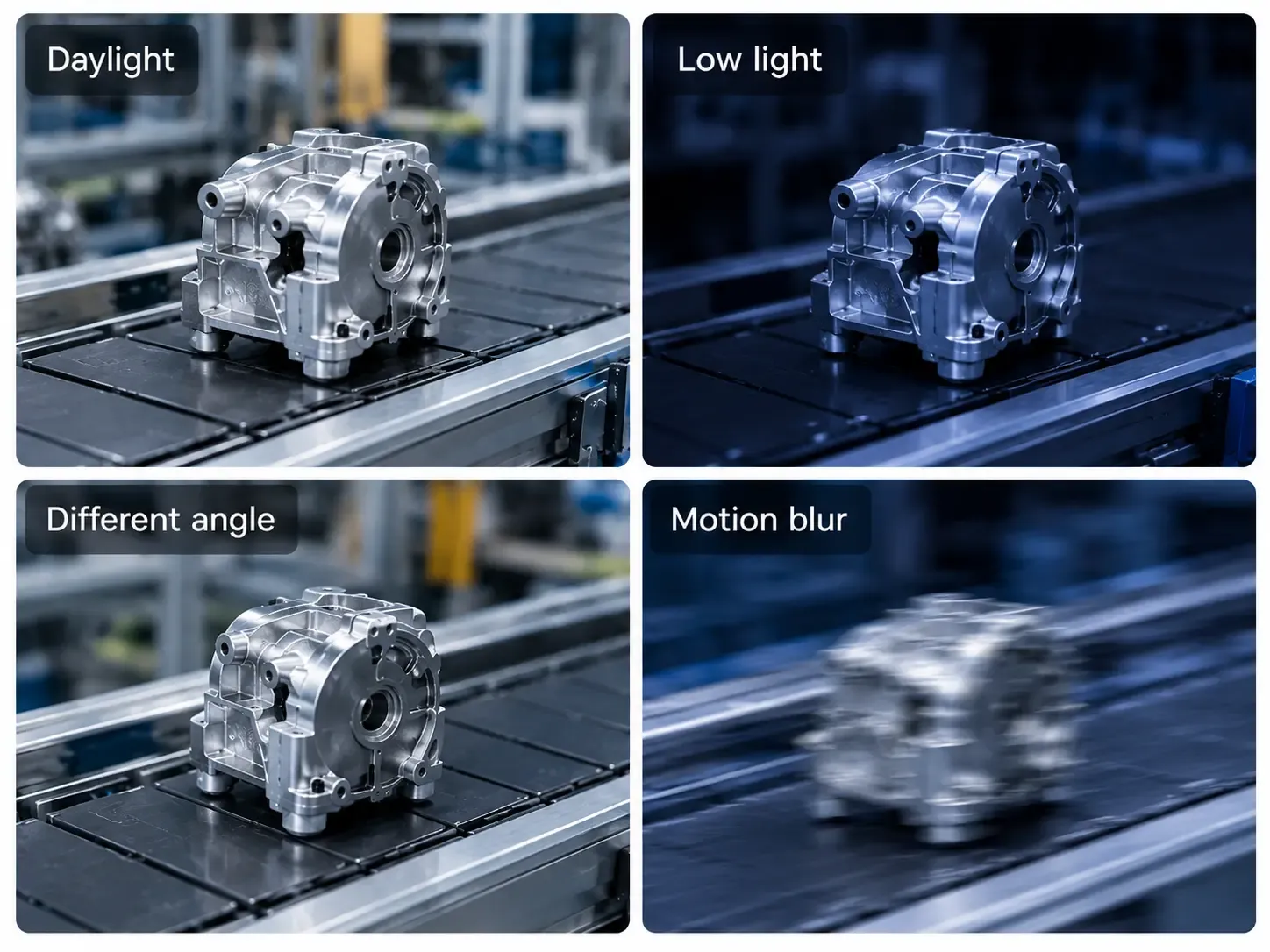
- Different lighting conditions and times of day.
- Changes in camera angle and distance.
- Objects in different orientations.
- Partial occlusion by people, equipment, or other objects.
- Motion blur and changes in object speed.
- Similar-looking objects that should not be detected as the target.
- Frames in which the target object is absent.
Negative examples—frames containing no target objects—can be important because the model must learn when not to produce a detection.
How Many Images or Video Frames Do You Need?
There is no universal number that guarantees a successful model. The required amount depends on the number of classes, visual variability, task difficulty, annotation quality, and model approach.
Instead of starting with an arbitrary target, build an initial dataset and identify where it lacks coverage.
For example, a dataset containing hundreds of clear images of one component may still be inadequate if the model must detect that component when it is partially hidden or viewed from an unusual angle.
Sample Video Frames Carefully
Video provides many frames, but adjacent frames often look nearly identical. Extracting large numbers of consecutive frames can increase dataset size without adding much useful variation.
Select frames that represent different objects, scenes, conditions, and relevant events. Inspect the results to ensure that important edge cases are included.
For evaluation, avoid placing near-identical frames from the same video clip in both the training and validation or test sets. Otherwise, the model may appear to generalize better than it actually does on new footage.
Step 3: Annotate the Dataset
Most supervised object detection workflows require labeled examples. For each target object, an annotator typically draws a bounding box around it and assigns the correct class.
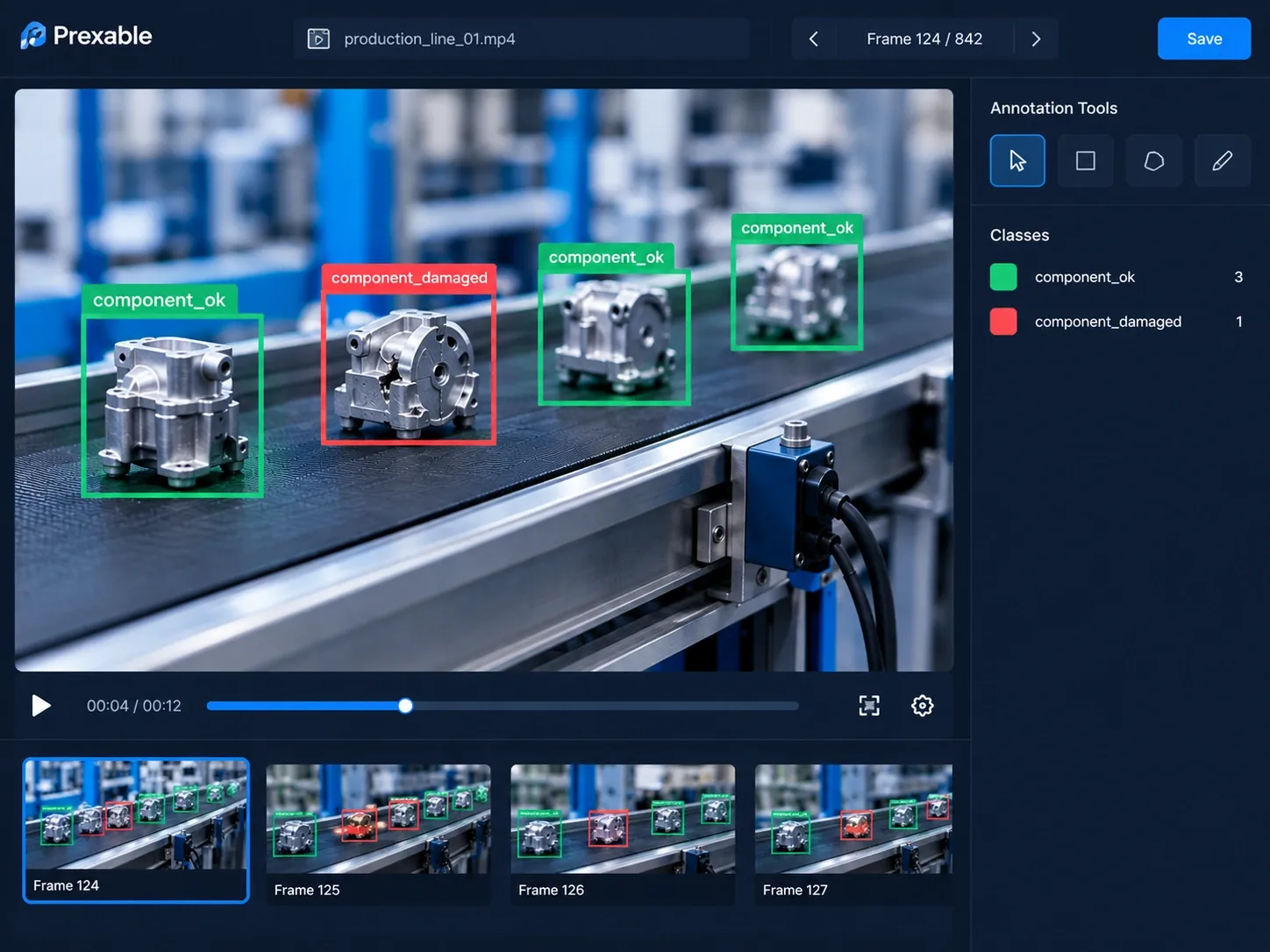
A simple example might use two classes:
component_okcomponent_damaged
Use separate classes only when the distinction is meaningful to the intended application and can be labeled consistently.
Follow Consistent Labeling Rules
Before annotating a large dataset, define rules for:
- How tightly boxes should fit around objects.
- Whether partially visible objects should be labeled.
- How to label overlapping objects.
- Which objects qualify for each class.
- How to handle ambiguous or low-quality frames.
Inconsistent labels can make it harder for a model to learn the intended distinctions. Review a sample of annotations before continuing with the full dataset.
Annotation tools may offer manual drawing, assisted labeling, or other workflow features. Choose a tool that supports your data format and the way you intend to train the model.
For larger video datasets, AI-powered video annotation and insight generation can help teams organize labeling workflows and turn video data into useful insights.
Step 4: Split the Dataset Correctly
Divide your labeled data into separate subsets for training, validation, and final testing.
| Dataset split | Purpose |
|---|---|
| Training | Provides examples the model learns from. |
| Validation | Helps compare training runs and tune model settings. |
| Test | Provides a final evaluation on data kept separate from model development. |
The appropriate proportions depend on the dataset and project. More important than a fixed percentage is ensuring that the splits are genuinely independent and representative of the intended use.
Prevent Data Leakage From Video
For video projects, split data by recording session, clip, camera, day, or location where appropriate—not by randomly assigning adjacent frames.
For example, if frames 100–150 from a clip are in the training set, placing frames 151–200 from the same clip in the test set may produce an overly optimistic result because the frames share nearly identical visual conditions.
Keep the test set separate while making development decisions. Use validation results to improve the model, then evaluate the final candidate on the held-out test data.
Step 5: Choose a Training Approach
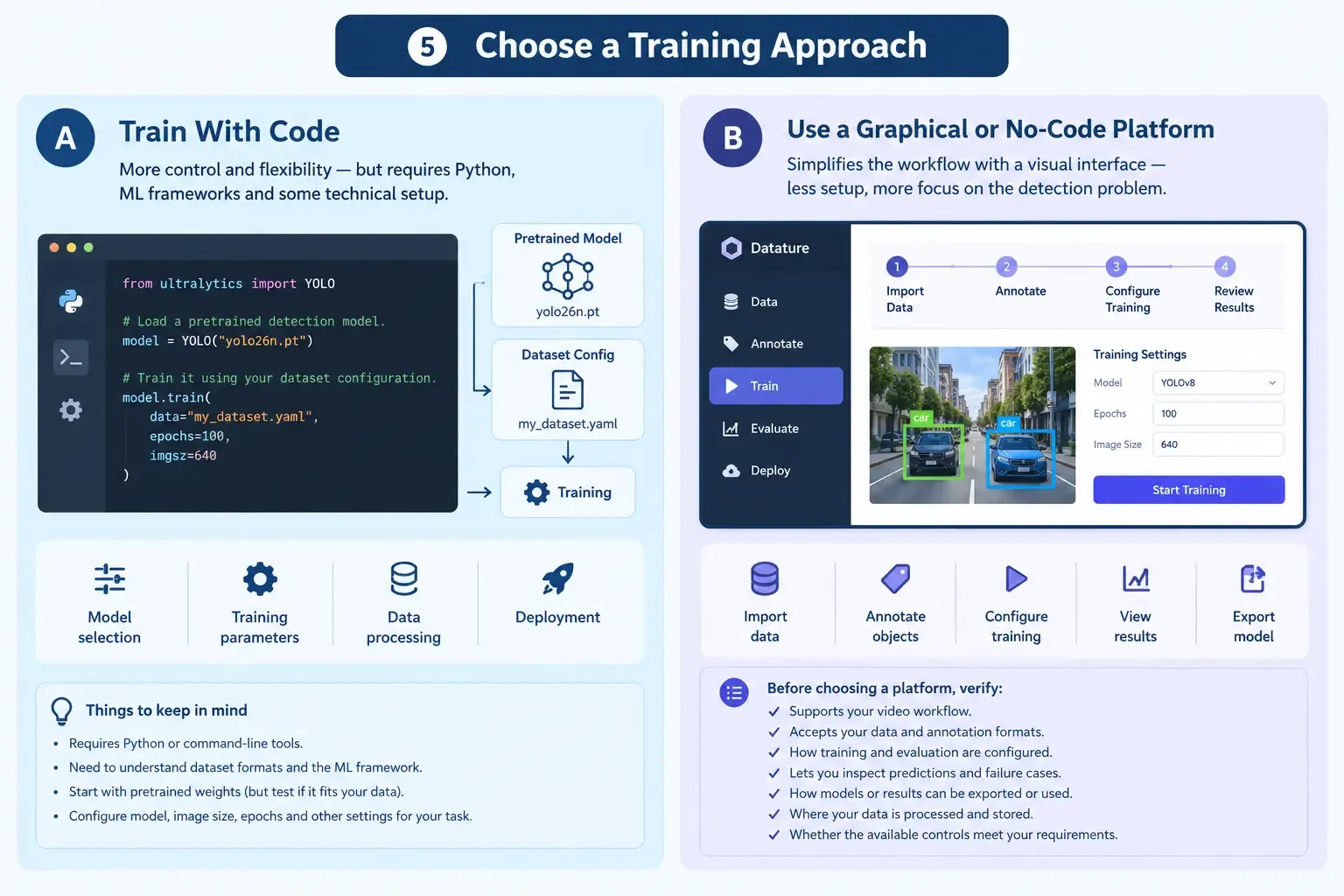
There are two broad approaches to building a custom object detector: using a code-based machine learning workflow or using a platform that simplifies model training through a graphical interface.
Option A: Train With Code
A code-based workflow can offer flexibility over model selection, training parameters, data processing, and deployment. It generally requires familiarity with Python or command-line tools, dataset formats, and the underlying machine learning framework.
For example, the official Ultralytics object detection documentation describes how to train a YOLO detection model using a dataset configuration.
A simplified Python example looks like this:
from ultralytics import YOLO

# Load a pretrained detection model.
model = YOLO("yolo26n.pt")

# Train it using your dataset configuration.
model.train(
    data="my_dataset.yaml",
    epochs=100,
    imgsz=640
)
This is an illustrative example, not a complete training project. It assumes that the required library is installed, the dataset is correctly prepared, and my_dataset.yaml points to compatible data and class definitions. The model, image size, training duration, and other settings should be selected for the specific task.
Starting from pretrained weights is a common approach because the model has already learned visual features from earlier training. Whether it is suitable for your data still needs to be tested.
Option B: Use a Graphical or No-Code Platform
A graphical platform can simplify tasks such as importing data, annotating objects, configuring training, and reviewing results.
This approach may suit teams that want to focus on the detection problem without managing every technical detail themselves. However, no-code does not eliminate the need for sound dataset preparation, evaluation, or technical checks.
For an example of a graphical training workflow, explore Datature's guide to building an object detection model.
Before choosing a platform, verify:
- Whether it supports your intended video workflow.
- Which file formats and annotation formats it accepts.
- How training and evaluation are configured.
- Whether you can inspect predictions and failure cases.
- How models or results can be exported or used.
- Where your data is processed and stored.
- Whether the available controls meet your operational requirements.
Do not assume that every platform supports every feature. Check the relevant documentation and test a small dataset before committing to a workflow.
Step 6: Train and Evaluate the Model
After preparing the dataset and choosing a training approach, run an initial training experiment.
Training settings such as model architecture, input image size, number of training epochs, and data augmentation can affect results. Change settings systematically so that you can understand which changes help.
Once training is complete, evaluate the model using labeled validation data and inspect its predictions on representative video frames.
Understand the Main Evaluation Metrics
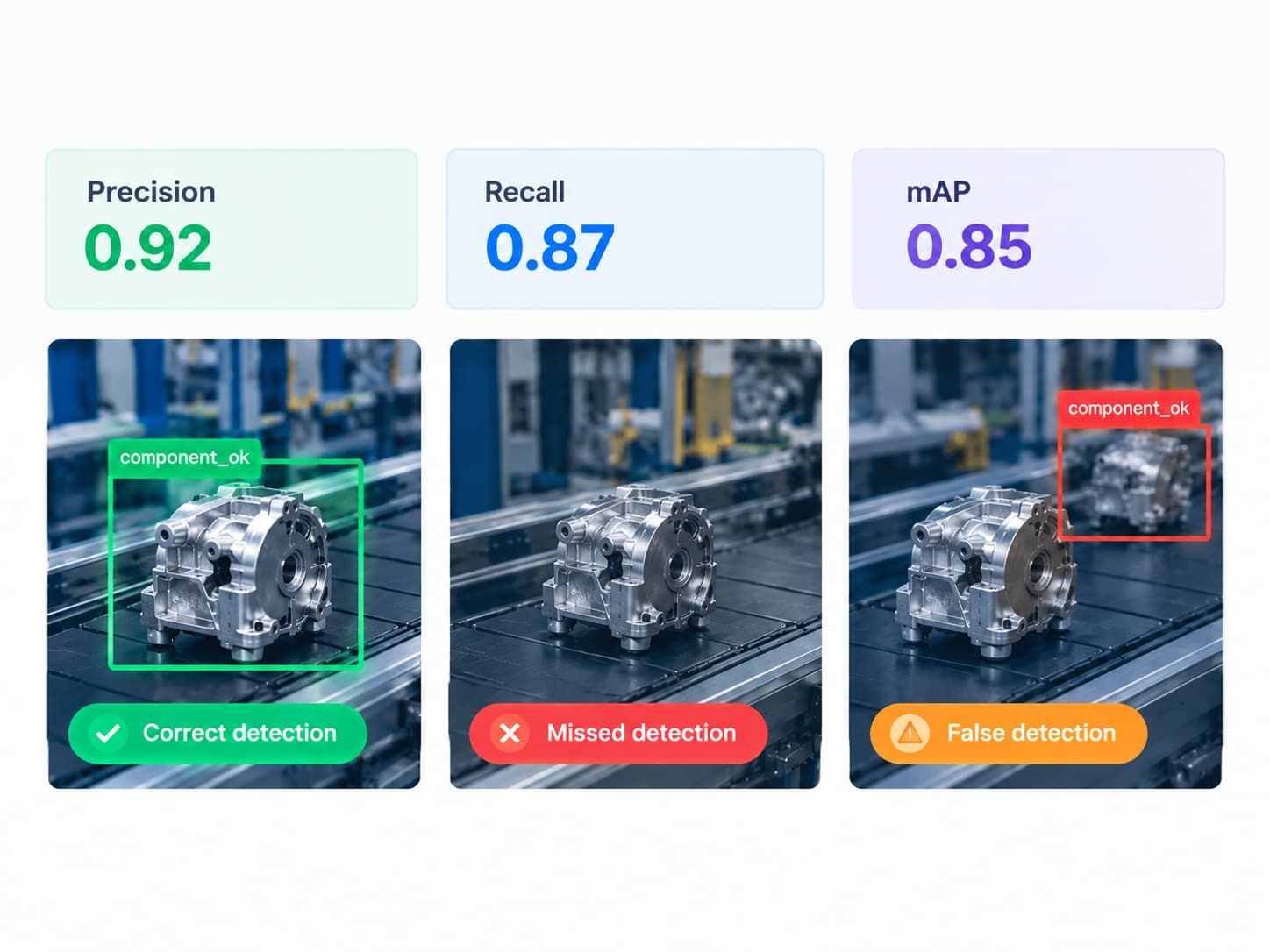
Precision measures how many predicted detections are correct. Low precision often indicates that the model is producing too many false positives.
Recall measures how many of the actual target objects the model detects. Low recall indicates that relevant objects are being missed.
Mean average precision (mAP) summarizes detection performance across classes and confidence thresholds, with results depending on the evaluation protocol and intersection-over-union thresholds used.
No single metric fully describes whether a model is suitable for a particular application. A team that must avoid missed defects may prioritize recall, while a workflow that triggers costly interventions for false alarms may place greater emphasis on precision.
Set evaluation criteria according to the consequences of each type of error.
Review Predictions Visually
Metrics help quantify performance, but reviewing annotated predictions can reveal why a model succeeds or fails.
Look for:
- Missed objects.
- False detections on similar-looking items.
- Bounding boxes that do not fit the objects well.
- Performance changes under different lighting conditions.
- Problems with small, distant, or partially obscured objects.
- Differences between performance on familiar clips and unseen recordings.
For additional guidance, consult the Ultralytics model-testing guide.
Test on Complete Video Clips
A model that performs well on individual frames may still be unsuitable for a complete video workflow.
Run it on representative clips and examine how predictions behave over time. Depending on your application, assess processing speed, missed events, duplicate detections, and whether the outputs remain useful when objects move or overlap.
If the application requires tracking, evaluate the tracking stage separately as well. Detection metrics alone do not establish how reliably objects can be followed across frames.
Step 7: Improve the Model Using Failure Cases
Model development is usually iterative. After the first evaluation, use the observed errors to decide what to change.
A practical improvement loop is:
- Collect representative failure examples.
- Group errors by their likely cause.
- Check whether the relevant conditions are represented in the training data.
- Correct annotation errors or add useful examples.
- Retrain or adjust the model where appropriate.
- Repeat the evaluation using consistent criteria.
For example, suppose a model detects a component reliably under bright lighting but misses it in dim conditions. Adding carefully labeled examples from dim conditions may help, provided the model architecture and other parts of the workflow are suitable.
If it repeatedly confuses two similar components, review class definitions, annotation consistency, and the visual differences available in the footage.
Avoid changing multiple settings at once without recording what changed. Keeping a record of datasets, model configurations, and evaluation results makes it easier to compare experiments and reproduce useful outcomes.
Use validation data during development and reserve the test set for a final assessment. If repeated development decisions are made using test results, the test set gradually stops providing an independent evaluation.
Step 8: Decide Whether the Model Is Ready for Use
A trained model is not automatically ready for production.
Before relying on its predictions, check that it meets the project's acceptance criteria under representative conditions. Consider both technical performance and the consequences of errors.
Questions to ask include:
- Does the model detect the required object classes?
- Are missed detections and false positives within acceptable limits?
- Has it been tested on unseen footage from the intended environment?
- Can the available hardware process video at the required speed?
- Does the workflow need tracking, counting, or additional decision logic?
- Are data access, retention, and processing arrangements acceptable?
- Is there a process for reviewing failures and reassessing performance when conditions change?
Deployment requirements vary. A model used for exploratory analysis may need a different level of operational assurance from one used in safety-critical or high-consequence decisions.
Document the model's limitations and avoid treating predictions as infallible. Where errors could cause significant harm, include appropriate human oversight and additional safeguards.
How Prexable Fits Into Custom Video AI
Prexable is a web-based video analysis platform focused on helping users work with custom AI models through detection, tracking, and recognition.
Its stated workflow is:
Upload → Train → Analyze → Review
This approach aligns with the broader process described in this guide: prepare data, train a model, analyze footage, and review the results.
If you are evaluating Prexable for your use case, confirm the specific supported capabilities, data formats, processing arrangements, and model workflow before relying on them. The right solution depends on your objects, footage, evaluation requirements, and operational constraints.
Explore Prexable's website to learn more about the platform.
Frequently Asked Questions
Can I Train a Custom Object Detection Model Without Coding?
Yes. Some platforms provide graphical workflows for data preparation, annotation, training, and evaluation. Their capabilities vary, so confirm that the platform supports your intended task and that you can inspect and validate its results.
How Much Data Is Needed to Train a Custom Object Detector?
There is no universal minimum. The amount depends on the task's complexity, the number of classes, visual variation, label quality, and the performance required. Start with a representative dataset, evaluate it, and add data where the results reveal meaningful gaps.
Can I Train an Object Detection Model Directly on Video?
Many object detection training workflows operate on labeled images or extracted video frames. A video-based project can therefore involve extracting representative frames, annotating them, and training a detector on the resulting dataset. Other stages may be needed for tracking or temporal analysis.
What Is the Difference Between Object Detection and Object Tracking?
Detection identifies objects in individual frames. Tracking associates detections across frames to follow objects over time. A video application may use both, depending on whether it needs to identify objects, follow their movement, count them, or analyze events.
How Do I Know if My Custom Model Is Accurate Enough?
Define success criteria before training, then evaluate the model on labeled data that was not used to train it. Review precision, recall, relevant detection metrics, and visual failure cases. Finally, test complete video clips under conditions similar to those expected in actual use.
Should I Train a Model From Scratch or Start With a Pretrained Model?
Starting with a pretrained model is a common option because it can reuse previously learned visual features. Training from scratch may be appropriate in some circumstances, but the decision depends on your data, task, available resources, and chosen framework. Compare approaches through controlled evaluation rather than assuming one is always better.
Conclusion
Training a custom object detection model for video starts with a clearly defined problem, not a particular algorithm. Collect representative footage, label objects consistently, split data carefully, choose a suitable training approach, and evaluate results on unseen examples.
Most importantly, treat evaluation as an ongoing part of the process. Inspect false positives and missed detections, improve the dataset where needed, and verify performance under realistic video conditions before relying on the model in an operational workflow.
As video AI evolves, the shift from tracking objects to understanding video events shows how video analysis can move beyond individual detections toward interpreting activities over time.
A structured approach makes it easier to determine whether custom object detection is appropriate for your use case—and what needs to improve before the results can be trusted.